









Hidden Desk-Side Hacks to Make Your Posture Corrector More Effective

Hidden Desk-Side Hacks to Make Your Posture Corrector More Effective
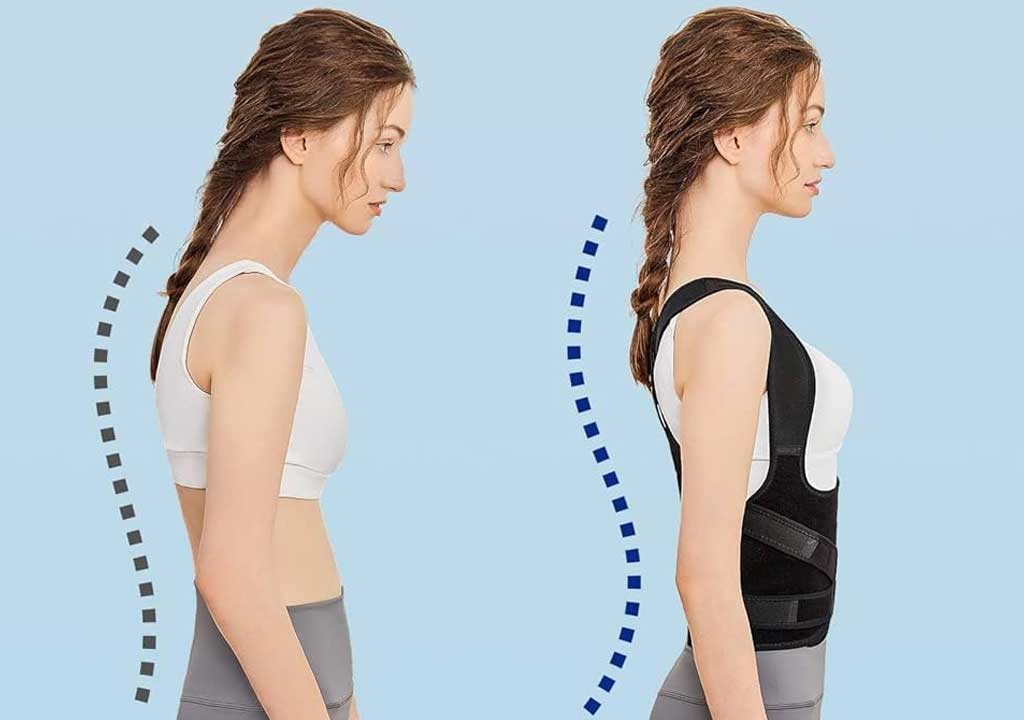
Posture correctors can be a powerful ally in combating slouched shoulders, forward head posture, and the chronic stiffness that sneaks up at a desk. But like any tool, their effectiveness isn't just about putting it on. It's about how you integrate it into a routine that supports healthy alignment all day long. Below, you'll find a practical guide filled with desk-side hacks-clever, accessible tweaks you can implement in minutes-that will help your posture corrector do more for you without becoming a burden.
Before we dive in, a quick note: a posture corrector is a reminder, not a replacement for movement and strength. Wear it as part of a broader strategy that includes ergonomic setup, mobility work, and mindful breathing. If you experience pain, numbness, or tingling, stop using the device and consult a healthcare professional.
1) Perfect the Fit at Your Desk: Quick Adjustments That Matter
A corrector that fits poorly will be uncomfortable, and discomfort discourages consistent use. Start by dialing in fit in a way that encourages upright alignment without pinching or constricting your ribs.
What to do right away:
- Put it on with a neutral spine (standing or sitting). Lift your chest slightly, roll your shoulders back, and gently pull the straps so you feel expanding across your upper back-without a hard sensation of pulling your ribs in.
- Check the placement of the padding. If it chafes or pokes, reposition or add a thin layer of fabric or padding where needed. Comfort is not optional-it's essential for consistency.
- Adjust strap tension in small increments. Start with the minimum tension that encourages a taller posture. If you notice your neck leaning forward or your shoulders rising toward your ears, back off a notch.
- Wear for short durations at first, then progressively increase. A common starting point is 15-20 minutes, gradually working toward 30-60 minutes as you become accustomed to the sensation.
On your desk, keep a small mirror or your phone camera handy to perform a quick alignment check. A simple two-minute scan-head over spine, ears over shoulders, shoulders over hips-can prevent subtle compensations from becoming ingrained habits.
2) Set Up Your Desk for Postural Success
Your environment is a silent coach for your posture. If your desk setup forces you into a collapsed position, even the best corrector won't fully compensate. Use these tweaks to reinforce a tall, neutral spine.
Key adjustments to make today:
- Monitor height: The top of your screen should be at or slightly below eye level so you're not tipping your head forward. If you have multiple monitors, place the primary one at eye level and position the secondary monitor in a way that you don't tilt your head excessively.
- Chair support: Choose a chair that supports the natural curve of your lower back. If your chair lacks lumbar support, use a small cushion or a rolled towel placed in the small of your back.
- Elbow and desk alignment: Your elbows should be near your sides at about a 90-degree angle, with forearms parallel to the floor. If your desk is too high or too low, adjust your chair height or add a footrest.
- Feet on the ground: Aim to keep both feet flat and supported. If your desk height makes this uncomfortable, try a footrest or a small incline under your feet.
- Keyboard and mouse position: Place them so your wrists stay straight and your forearms are supported. Avoid reaching forward or hunching over to reach the keyboard.
Additionally, consider a simple "check-in" routine at the top of each hour. Stand up, walk a short distance, and perform a couple of mobility moves to reset your alignment before you sit back down.
3) Micro-Movements: Small Postural Wins That Add Up
Posture correctors remind you to straighten up, but your body also benefits from small, controlled movements that counteract stiffness. Build micro-matches into your day that reinforce upright lines without requiring a full workout.
Micro-movement ideas to weave in:
- Scapular retractions: Sit tall, squeeze your shoulder blades together for 5-10 seconds, then release. Repeat 6-8 times when you're at your desk.
- Chin tucks: Gently pull your chin straight back, keeping your gaze forward. Hold for 5 seconds, then release. Do 8-12 reps every couple of hours.
- Thoracic spine rotations: Place a hand on your opposite knee and gently twist your torso, then switch sides. Do 6-8 repetitions per side.
- Wall angels: Stand with your back against a wall, arms at 90 degrees, and slide your arms up and down the wall in a slow arc. Do 10-12 reps, 2-3 sets.
- Neck decompression: Tilt your head slightly away from the posture‑corrector side, then return center. Repeat on the other side. Do 6-8 reps per side.
With these micro-movements, your postural habit becomes more dynamic and less rigid. The aim is to create a balance between stillness (the corrector's cue) and controlled motion that maintains mobility along your spine.
4) Breathing and Mindfulness: Align Your Breath with Alignment
Breathing is the invisible partner to good posture. When you breathe deeply and evenly, you reduce muscular tension, support core stabilization, and remind your nervous system that upright alignment is the default, not the exception.
Try these practices while wearing your corrector or during a break:
- Diaphragmatic breathing: Place a hand on your abdomen and take deep breaths that expand your belly on the inhale. Exhale fully to promote relaxation in the chest and shoulders.
- Box breathing: Inhale for 4 counts, hold for 4, exhale for 4, hold for 4. Repeat for 2-3 minutes. This calms the nervous system and reduces compensatory tension.
- Momentum breathing: On each inhale, imagine widening your chest slightly but keeping your shoulders down. On each exhale, imagine melting the shoulders away from the ears.
- Breath-reset during micro-breaks: Use a 60-second timer to practice 6-8 cycles of slow, quiet breathing whenever you notice you're slouching.
Breath awareness helps your brain and body stay synchronized. Over time, you'll notice you reach for posture not just because the device reminds you, but because your breathing signals a more relaxed, open alignment.
5) Strength and Mobility: Build a Foundation That Supports Your Corrector
A posture corrector is most effective when your back, shoulders, and thoracic spine have the strength and mobility to hold an upright position without strain. A simple at-desk routine can augment the corrector's effects by addressing underlying restrictions and weaknesses.
Two short routines you can alternate daily:
Upper-back and shoulder mobility
- Thoracic extensions on a foam roller: Lie on your back with a foam roller under your upper back. Support your head with your hands and gently extend over the roller to create a comfortable backbend. Do 6-10 passes along the mid to upper back.
- Doorway pec stretch: Stand in a doorway with forearms resting on the doorframe and step forward slightly to stretch the chest. Hold for 20-30 seconds, repeat 2-3 times.
- Scapular push-ups: In a push-up position, keep arms straight and pinch your shoulder blades together, then relax. Do 2-3 sets of 10 reps.
Thoracic mobility and spine health
- Cat-cow with thoracic emphasis: On all fours, alternate between a rounded spine (cat) and an extended upper back (cow), focusing movement through the mid-back. Do 10-15 reps.
- Seated thoracic rotation: Sit with hips squared, place one hand on the opposite knee and rotate your torso gently. Hold briefly, then switch sides. Do 8-12 reps per side.
Incorporate these moves into a 10-15 minute daily routine. Consistency matters more than intensity here-the goal is to increase awareness, improve mobility, and reduce compensatory patterns that stress the neck and lower back.
6) Hidden Desk-Side Hacks: Low-Tech Tweaks That Amplify Your Corrector
Now for the "hidden" hacks-the small, often overlooked actions that can dramatically magnify your corrector's impact without adding complexity to your day.
Mini‑habits for consistent cues
- A cue card on your monitor: Write one or two keywords like "Shoulders Down" or "Neutral Spine" and place it where you'll see it every time you glance at your screen. A tiny reminder can pull you back from slouching in a moment of fatigue.
- Phone reminders: Set hourly prompts for a posture check or a two‑minute mobility break. Use a short vibration so you don't have to pull out your phone to look at it.
- Mirror cue: If you have a small mirror on your desk, use it to check head‑over‑spine alignment during long stretches of work. Seeing the reflection reinforces proper posture in real time.
Office gear that nudges good posture
- Ergonomic chair accessories: A slim lumbar support cushion or a rolled towel behind your lower back can preserve the natural curve even on budget chairs.
- Footrest or adjustable height platform: A reachable footrest helps you maintain an active seated posture, reducing the tendency to slump.
- Anti-fatigue mat: If you stand at a desk, a cushioned mat can reduce fatigue in the feet and calves, making it easier to maintain upright alignment for longer periods.
- Desk height variations: If possible, alternate between sitting and standing with a standing desk or a height-adjustable desk. Mixing postures reduces stiffness and helps you relearn alignment in multiple contexts.
Tech-free cues that keep you accountable
- Posture-friendly lighting: Ensure your screen brightness and desk lighting don't tempt you to crane your neck forward for glare relief. Position lights to reduce eye strain and head tilt.
- Cable management: Organized cables reduce the tendency to lean forward to see the screen clearly. A clean workspace supports a clean spine.
- Hydration and breaks: A small glass of water nearby nudges you to pause, refill, and recheck posture during breaks.
Creative storage for serenity and alignment
- Back-safe storage: Keep frequently used items within arm's reach to avoid leaning forward. Use organizers that place items at chest height rather than down at desk level.
- Wall-mounted shelves: If you're short on desk space, consider a wall-mounted shelf at eye level to reduce the need to lean forward to retrieve objects.
- Tension-free desk layout: Keep power cords and peripherals arranged to prevent you from twisting or leaning into the desk to access them.
These hidden hacks aren't about spending more time at your desk. They're about nudging your body toward a sustainable posture rhythm, so your corrector works in harmony with your daily habits rather than fighting against them.
7) Maintenance and Care: Keeping Your Corrector Comfortable and Effective
A well-maintained device is a high-performance tool. Proper care ensures the corrector remains comfortable, hygienic, and effective over weeks and months of use.
Best practices for care:
- Regular cleaning: Check the manufacturer's instructions, but most fabrics can be wiped with mild soap and water or machine-washed on a gentle cycle. Air dry to prevent fabric damage.
- Inspect for wear: Look for frayed straps, stretched stitching, or worn pads. Replace damaged components promptly to maintain proper alignment and safety.
- Rotate use: If you own more than one device or different sizes, rotate which one you wear to avoid excessive pressure on a single area of your shoulders or chest.
- Skin care: Keep skin clean and dry under the straps. If irritation occurs, place a breathable cloth barrier between skin and fabric and consider a lighter tension during initial wear.
- Storage: Store in a cool, dry place away from direct sunlight to preserve fabric integrity.
Remember: comfort and consistency trump intensity. If the device becomes painful, remove it and reassess fit, tension, and wear time before returning to use.
8) Troubleshooting: What to Do When Things Don't Feel Right
Even with careful setup, you may encounter issues. Here are practical fixes for common problems and how to approach them without derailing your progress.
Issue: Pins and needles or numbness in arms, hands, or chest
Cause: Straps too tight or pressure points on soft tissue.
Fix: Loosen gradually and re-check alignment. Ensure straps lay flat against the skin and avoid crossing over bony prominences. If numbness persists, take a longer break and consult a healthcare professional if needed.
Issue: Neck or headaches from forward head posture
Cause: Tension in the neck from overcorrection or strap pull in the wrong area.
Fix: Focus on optimizing thoracic extension and shoulder retractions rather than pulling your head back hard. Use the chin-tuck and thoracic mobility moves described earlier to relieve neck strain.
Issue: Skin irritation or chafing
Cause: Friction points or rough fabric, especially during warm weather or prolonged wear.
Fix: Add a thin layer between skin and fabric (like a soft undershirt), adjust padding, or switch to a model with breathable, moisture-wicking material. Shorten wear sessions until skin adapts, then gradually increase.
Issue: Corrector seems to pull you out of alignment instead of guiding you
Cause: Over-reliance on the device, or wrong fit causing compensations elsewhere (neck, hips, or knees).
Fix: Revisit fit adjustments, ensure your core and shoulder blades are actively engaged to maintain alignment, and pair device wear with the micro-movements and mobility work described above. If needed, consult a physical therapist for individualized guidance.
9) A Practical Two-Week Plan to Integrate the Hacks
To help you translate these ideas into a real-world routine, here's a simple, progressive two-week plan. Adjust the pace to your schedule and comfort level.
Week 1: Foundation and Habit Formation
- Day 1-3: Fit and first wear. Wear the posture corrector for 15-20 minutes, twice daily. Do the micro-movements during the wear sessions and perform a 5-minute mobility routine at the end of each work period.
- Day 4-7: Extend wear to 30 minutes, two to three times per day if comfortable. Add hourly desk checks with a two-minute breathing or mobility break.
Week 2: Integration and Mobility Deepening
- Days 8-10: Add thoracic mobility routine on alternate days. Maintain wear time at 30-45 minutes per session, with short breaks to reset posture.
- Days 11-14: Increase to 45-60 minutes per session if comfortable. Introduce a standing desk interval (10-15 minutes) daily to diversify postural demands.
Throughout the plan, keep a simple journal of your experiences: wear time, comfort, or any pain, and how often you practiced the micro-movements. This will help you refine fit and routines over time.
Conclusion: Small Shifts, Big Gains
Your posture corrector is most effective when used as part of a broader posture system-one that aligns desk setup, breathing, movement, and conscious posture cues. The hacks above are designed to fit into a busy workday, with minimal disruption and maximum impact. By paying attention to fit, environment, micro-movements, breathing, and practical desk-side tweaks, you can unlock the full potential of your posture corrector and reduce the chronic weariness that comes from slouching.
Remember: consistency is king. Short, regular sessions that combine a correctly fitted device, ergonomic seating, mobility work, and mindful breathing will likely yield better long-term results than longer, sporadic wearing. Treat your posture as a daily practice, not a one-time fix, and your desk life-along with your overall well-being-will thank you.
If you'd like, tell me about your current desk setup, the posture corrector you're using, and any challenges you're facing. I can tailor the hacks to fit your exact situation and offer a step-by-step plan that blends with your work calendar.
LIKED THIS ARTICLE? SHARE IT: