










Desk Job Posture: Simple Fixes for Improving Alignment Every Day

Desk Job Posture: Simple Fixes for Improving Alignment Every Day
If you spend most of your workday typing, scrolling, and meeting from a chair at a desk, your posture is one of the most important investments you can make for comfort, focus, and long-term health. Good alignment isn't about sitting stiffly or "holding it in." It's about creating a dynamic balance that keeps your spine, joints, and muscles operating efficiently as you move through your day. In this guide, you'll find practical, science-informed fixes you can implement today-without expensive equipment or a complete overhaul of your work routine.
Every time you adjust your chair, screen, keyboard, or breathing pattern, you're nudging your posture toward a neutral alignment. Over weeks and months, these small changes compound into less neck tension, fewer headaches, more stable energy, and a healthier back. The goal isn't perfection; it's consistent improvements that fit real life-meetings, deadlines, coffee runs, and the occasional video call with a colleague halfway across the world.
Why good alignment matters
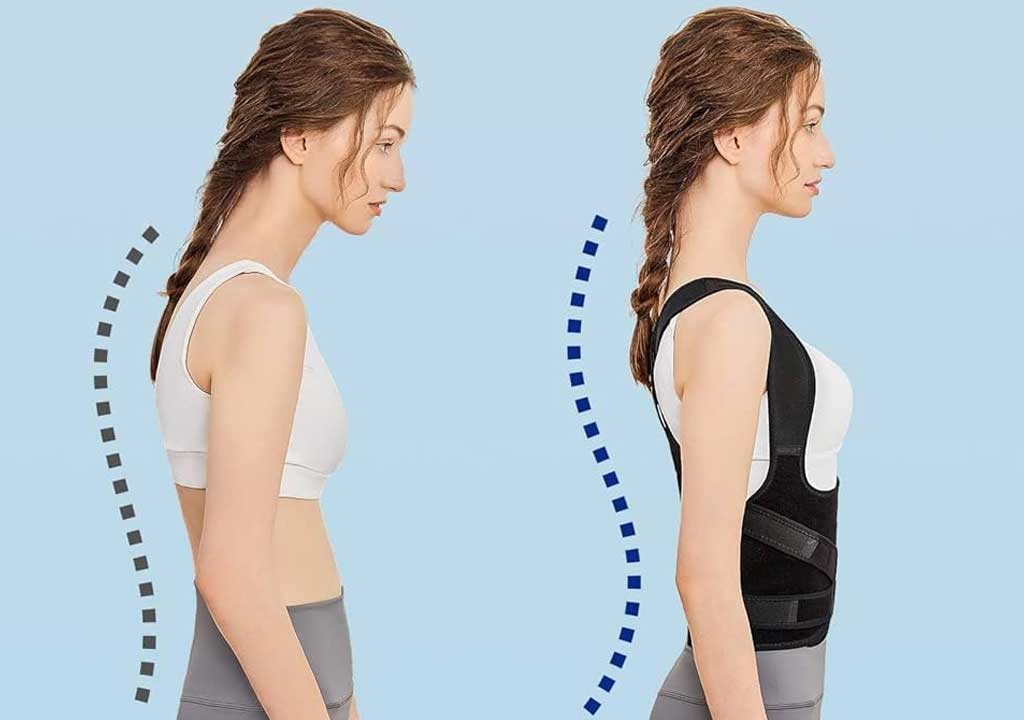
Good alignment supports a neutral spine-the natural S-curve of your spine when you're upright. When you maintain neutral alignment, your bones bear most of the load instead of your muscles. This reduces muscle fatigue, distributes stress more evenly, and helps prevent common desk-job ailments like neck tension, shoulder pain, upper back strain, and elbow or wrist discomfort. In addition, posture interacts with breathing and core engagement: a relaxed but upright posture can improve oxygen intake and make it easier to activate your core muscles, which further supports your spine.
Misalignment, even if it feels subtle, can snowball over the day, week, and year. Forward head posture (your head jutting forward to look at the screen), rounded shoulders, and a collapsed lower back are common culprits. They may contribute to headaches, numb fingers, or low back pain. The good news is that you don't need to become a posture ninja to improve things. Small, repeatable adjustments throughout the day add up to meaningful relief and better daily function.
Set up your desk like a pro
Ergonomic design starts with a few key measurements and placements. Use these targets as your baseline, then tailor them to your body and the furniture you have access to at work or home.
Chair height and back support
Your feet should rest flat on the floor (or on a footrest) with your knees roughly at a 90-degree angle. Your hips should be slightly higher than your knees, which helps maintain a natural lower-back curve. If your chair lacks adequate lumbar support, add a small rolled towel or a lumbar cushion to encourage the inward curve of the lower spine. Sit back in the chair so your spine is supported by the chair's backrest most of the time, rather than perched at the edge.
Monitor position
The top of your monitor should be at or slightly below eye level, and the monitor should be about an arm's length away. If you find yourself leaning forward to read the screen, raise the monitor or use a stand. A monitor that's too low or too far away often triggers neck extension or a forward head posture, which can strain the back of your neck and shoulders.
Keyboard and mouse placement
The keyboard and mouse should be within easy reach so your elbows can stay close to your body, ideally at about a 90-degree angle. Your wrists should be in a neutral position, not dramatically flexed up or down. If you find yourself reaching forward or having to yawn your wrists into position, adjust the desk height or consider an adjustable keyboard tray or a split keyboard. A properly placed input setup reduces forearm fatigue and protects the wrists from repetitive strain.
Desk depth and surface
Reserve enough space for your forearms to rest lightly on the desk or on the armrests without lifting the shoulders. A crowded desk can force you to slouch forward to see the screen or reach for items, which hurts alignment over time. Clear surfaces and a predictable layout help you maintain a neutral posture through the day.
Feet, hips, and knee alignment
Crossing legs or tucking one leg under the chair can tilt your pelvis and disrupt your neutral spine. If possible, keep both feet flat and evenly spaced. A small footrest can help you achieve a comfortable knee angle if you have a tall desk or can't lower the chair enough.
Movement and micro-breaks: the daily cadence
The human body is designed to move. Prolonged static sitting can lead to stiffness and fatigue, even if you've optimized your desk setup. Build a simple cadence of movement into your day so your body gets regular opportunities to reset and re-engage.
Here are practical guidelines you can start with today:
- Stand up or walk for 2-3 minutes every 25-30 minutes if you can. If interrupting every 30 minutes is tough, aim for every 45-60 minutes and make a longer movement break a few times per day.
- Do a quick chair stretch or mobility routine during coffee breaks or between meetings. A few minutes can make a big difference in how your back and shoulders feel.
- Incorporate micro-mails: while on a call, practice chest-opening postures or shoulder blade squeezes to reset posture even without leaving your chair.
- Drink water regularly; hydration supports the hydration of discs and joints and gives you natural reasons to stand and move.
Consistency matters more than intensity. The goal is to embed a rhythm that reminds you to move and adjust, rather than relying on willpower to sit perfectly still for hours on end.
Simple stretches and mobility routines you can do at your desk
Movement doesn't have to be dramatic to be effective. Here are a few evidence-informed stretches and mobility moves you can perform without leaving your workspace. Start with a gentle 5-minute routine and build up to a 10-minute mini-workout during longer breaks if your schedule allows.
Neck and head alignment
Gently tilt your head toward each shoulder to release lateral neck tension, then drop your chin toward your chest to stretch the back of the neck. Finally, look to the left and right to mobilize the cervical joints. Hold each position for 10-15 seconds and repeat 2-3 times per side. Avoid forceful movements; move within a comfortable range.
Shoulder blade squeezes and chest opener
Sit tall with feet flat. Squeeze your shoulder blades together and down toward your spine, then release. Repeat 10-15 times. For a chest opener, interlace your fingers behind your back and gently lift your arms while keeping your shoulders down. Hold for 15-20 seconds. These moves counteract the tendency to hunch over a keyboard.
Thoracic spine rotation
Place your hands on your shoulders, sit tall, and gently rotate your upper torso to the left and then to the right. This mobility drill helps loosen the mid-back and supports better overall posture when you twist or reach for items on your desk. Do 6-8 rotations per side.
Hip flexor and hamstring stretches
Stand up and take a stride back with one foot to stretch the hip flexor of the opposite leg. Keep your torso upright and gently tilt forward. Hold 20-30 seconds per side. For hamstrings, place one heel on the edge of your chair or a low surface with the knee straight, hinge at the hip, and lean forward slightly. Hold for 20-30 seconds on each leg.
Wrist and forearm care
Extend the arm with the palm facing up, gently pull the fingers back with the other hand to stretch the forearm. Then switch to the palm facing down to stretch the opposite side. Repeat 15-20 seconds per stretch. This helps prevent repetitive strain injuries and supports a comfortable typing posture.
Ankle circles and ankle flexes
Lift one foot off the ground and rotate the ankle in circular motions for 10-15 seconds, then switch direction. Point and flex the toes to promote circulation and reduce stiffness, especially if you're wearing restrictive shoes or sitting for long periods.
Habits that reinforce good alignment
Posture is a habit, not a one-time adjustment. The following practical habit-building strategies can help you maintain alignment throughout your day without turning it into a chore.
One-minute posture checks
Set a gentle reminder on your phone or computer to perform a quick posture check every hour. During the check, ask yourself: Are my ears aligned over my shoulders? Are my shoulders relaxed and not shrugged? Is my lower back supported? Are my feet flat or supported? If the answer is "no" to any of these, make a small adjustment and note it for the next check.
Anchor cues and environmental design
Use environmental cues to trigger good posture. For example, place a sticky note on your monitor that says "Check posture," use a standing desk for certain tasks, or position frequently used items at arm's length to encourage proper reach mechanics.
Habit stacking
Pair a known habit with posture work to improve adherence. For instance, after you finish a routine email, stand up and perform the shoulder blade squeeze sequence. Linking new habits to established ones makes them easier to maintain.
Standing desks: should you use one, and how to do it well
Standing desks can reduce prolonged sitting and encourage movement, but they aren't a universal fix. If you're considering a standing setup, use these guidelines to maximize benefits while minimizing discomfort.
Start with a transition period: alternate between sitting and standing, beginning with 15-30 minutes of standing per hour and gradually increasing as you feel comfortable. Keep your monitor at eye level and your keyboard and mouse at a height that allows your elbows to rest at your sides with a 90-degree angle. If your feet or legs begin to ache, step down or add a cushioned anti-fatigue mat. It's important to switch between positions to avoid fatigue from long periods in either stance.
Remember that standing still for long stretches can cause fatigue, just as sitting still can. The key is movement and micro-adjustments-shifting weight between legs, stepping in place, or taking short walks around the office to keep blood flow and attention engaged.
Common mistakes and how to fix them
Even with good intentions, people often fall into posture traps. Here are frequent missteps and practical fixes you can apply today.
- Forward head posture: Sit or stand tall and align your ears over your shoulders. Use a monitor height that minimizes the need to tilt your head downward or forward.
- Rounded shoulders: Practice shoulder blade squeezes and regularly reset your posture during the day. Consider a chair with good lumbar support to prevent upper-back rounding.
- Over-tight shoulders and neck tension: Relax your jaw, unclench your teeth, and drop your shoulders away from your ears. Gentle mobility work can help release persistent tension.
- Underactive core and pelvis tilt: Engage the neutral pelvis and core muscles gently when sitting. A slight posterior pelvic tilt reduces excessive arching; maintain a comfortable engagement rather than a hard pull-in.
- Wrist extension and ulnar deviation: Keep wrists in a neutral position when typing or using a mouse. If necessary, use an ergonomic keyboard or a vertical mouse to reduce strain.
- Cross-legged or rigid seating: Keep both feet supported and approximately hip-width apart. If you need to, use a small stool or footrest to maintain a comfortable stance.
Signs you need to adjust your setup or routine
Pay attention to subtle signals from your body. The sooner you respond, the less likely you are to develop chronic issues.
- Persistent neck or shoulder pain that doesn't improve with a few days of adjusted posture or movement.
- Frequent headaches that worsen after long screen sessions.
- Numbness or tingling in the hands, fingers, or arms, especially after typing or mouse use.
- Lower back stiffness that improves with movement but returns after a few hours of sitting.
- Eye strain or general fatigue around midday that suggests you might be slouching or losing the natural alignment of your body.
If pain is persistent or severe, or if you have a history of spine injury, consult a healthcare professional or an ergonomic specialist for personalized guidance.
A practical daily routine you can follow
Consistency is easier when you have a simple routine you can repeat every day. Here's a practical, scalable routine you can start with, designed to take as little as 15 minutes total but with meaningful impact over time.
Morning setup (before you start your first task):
- Set chair height to allow a 90-degree bend at the knees with feet flat on the floor or a footrest.
- Position monitor so the top is at or slightly below eye level; align the screen to reduce glare.
- Place keyboard and mouse within easy reach and ensure wrists remain neutral when typing.
- Do a 2-minute mobility routine focusing on neck, shoulder blades, and hips to prime your body for the day.
During work hours (routine cadence):
- Every 25-30 minutes: stand up, take a short walk, or perform 2-3 stretches (neck, shoulders, hips).
- Every hour: perform a 60- to 90-second mobility block that targets the mid-back, chest, and hips.
- Before each long phone call or video meeting: do a quick posture check for 30 seconds and readjust as needed.
End-of-day wind-down (to prepare for comfort the next day):
- Record any recurring discomfort and adjust your setup or routine based on what you notice.
- Do a light 5-minute stretch sequence to reset posture and reduce stiffness before leaving your workspace.
- Prep your workstation for the next day by clearing clutter and aligning the monitor and input devices in a consistent setup.
Tips for sustainable habit formation:
- Track your posture goals for a week or two; celebrate small wins (e.g., "I kept my laptop at eye level for today's task list").
- Use reminders that feel helpful, not nagging-gentle cues tend to be more sustainable.
- Adjust your environment gradually as you learn what works best for you. Small improvements often feel more sustainable than a big, abrupt change.
Choosing the right tools and resources
Not everyone has access to a fully ergonomic setup, but you can still improve your posture with thoughtful choices and affordable adjustments. Consider these options:
- Ergonomic chair with adjustable height and lumbar support.
- Monitor stand or adjustable monitor arm to achieve proper eye level.
- Keyboard tray or adjustable desk for optimal elbow height.
- Footrest to achieve a comfortable knee angle if your chair is tall or if you work at a higher desk.
- Standing desk converter or sit-stand desk to alternate postures across the day.
- Gentle, non-slip anti-fatigue mat for standing periods to reduce fatigue in the feet and legs.
Small changes, like a lumbar cushion, a simple monitor riser, or a better mouse position, can have a meaningful impact on your comfort and posture. Start with one well-chosen adjustment and build from there.
Posture myths and truths you should know
There's a lot of misinformation about posture, and some extremes are not worth chasing. Here are a few common myths dispelled:
- Myth: You must sit perfectly upright all the time. Truth: A natural, relaxed posture with periodic micro-adjustments is healthier than fixed rigidity. Aim for consistency rather than perfection.
- Myth: You should never slouch. Truth: Occasional, gentle slouching can be acceptable if you maintain overall alignment and don't push your spine into compression for long periods.
- Myth: Standing desks cure all back pain. Truth: Standing desks can help when used properly, but they must be accompanied by movement and proper alignment. Prolonged standing without movement can create different issues.
- Myth: Ergonomics are only for office workers. Truth: Posture and alignment benefit anyone who spends long hours sitting or performing repetitive tasks, regardless of job type.
Measuring progress and staying motivated
Progress can be gradual, but you can track it in practical ways:
- Journaling: Note how your back, neck, and shoulders feel at the end of a workday and after implementing specific adjustments.
- Habit streaks: Track how many days you maintain a consistent posture routine or hit your movement targets in a row.
- Baseline checks: Periodically reassess your setup (monitor height, chair support, keyboard position) and adjust as you gain more insight into what works for you.
Small, measurable wins reinforce behavior. If you notice less neck pain, fewer headaches, or a more comfortable workday, you'll be more inclined to continue investing in your posture habits.
What to do if pain persists
While most desk-posture improvements reduce common aches, some symptoms require professional attention. Seek medical advice if you experience:
- Persistent back, neck, or shoulder pain that doesn't improve after a few weeks of posture corrections and movement.
- Neurological symptoms such as numbness, tingling, or weakness in the hands or legs.
- Severe or sudden pain, which may indicate something more serious requiring a clinician's assessment.
In these cases, a healthcare professional, physical therapist, or occupational therapist can provide personalized guidance and targeted exercises tailored to your situation.
Putting it all together: a simple template for daily practice
Here's a concise template you can copy and personalize. It's designed to be non-disruptive, easy to adopt, and compatible with a typical 8-hour workday.
- Begin with setup: adjust chair height, monitor position, keyboard/mouse placement, and consider a lumbar support; ensure feet are flat or properly supported.
- Start the day with a 5-minute mobility routine: neck, shoulders, chest, hips, and wrists.
- Apply a 2-3 minute posture check before beginning each major task; correct as needed.
- Move every 25-30 minutes: stand, walk, or perform 1-2 stretches.
- Alternate between sitting and standing if you have a sit-stand option, aiming for a comfortable balance.
- End your day with a 5-minute wind-down stretch sequence and a quick reflection on what to adjust tomorrow.
With this template, you're not chasing perfection; you're building a predictable routine that reduces discomfort and supports your daily performance.
Final thoughts: posture as a daily wellness habit
Good desk posture is not a one-and-done fix. It's a continuous practice that blends smart equipment setup, deliberate movement, and mindful alignment. The goal is to be aware of how your body feels in real time and to respond with small, sustainable adjustments. Over weeks and months, these adjustments reduce strain, increase energy, and improve focus-allowing you to perform at your best while protecting your spine for the long haul.
Start small. Pick one or two adjustments you can make today-perhaps raising your monitor to eye level and adding a short mobility break at lunch. Observe how these changes affect your comfort and mood, then expand your routine gradually. Remember: the most powerful posture change you can make is the one you actually practice tomorrow. And the next day. And the day after that.
Take the next step
If you'd like, share in the comments which posture tweak you plan to implement first and what you hope to gain. I'll be glad to offer tailored tips or help you troubleshoot any setup challenges you encounter. For more resources, consider checking in with an ergonomics specialist or a physical therapist who can assess your unique needs and provide a personalized plan that complements your daily routine.
By committing to a few simple fixes and building them into your everyday workflow, you can transform a desk job into a healthier, more comfortable experience. The alignment you create today is an investment in your future energy, productivity, and well-being. Here's to everyday improvements that compound into lasting change-one small adjustment at a time.
LIKED THIS ARTICLE? SHARE IT: